

Close Menu
  • News
  • Guides
    • Grounded 2
    • Wild Hearts
    • Monster Hunter Wilds
    • Monster Hunter World
    • Monster Hunter Stories 2
    • Monster Hunter Stories 3
    • Monster Hunter Now
    • Monster Hunter Rise
    • Monster Hunter Outlanders
  • Features
  • Guard Up Tool
Facebook X (Twitter) Instagram
Trending
  • Which Monster Hunter Games Have Crossplatform Play and Cross-Save? Full List Explained
  • Everything Coming to the Second Closed Beta of Monster Hunter Outlanders
  • MH Outlanders 2nd Beta Test Announcement Reveals Two New Adventurer Partners with Unseen Movesets Yet
  • What Does Affinity Do In Monster Hunter Wilds? Explained & Essential Armor Skills
  • How to Defeat Arkveld in Monster Hunter Stories 3
  • Monster Hunter Stories 3: Full Decoration List
  • Monster Hunter Stories 3: Is There a Hunter Party Member? Answered
  • All Recipe List & Locations in Monster Hunter Stories 3
Monster Hunter HQMonster Hunter HQ
  • News
  • Guides
    • Grounded 2
    • Wild Hearts
    • Monster Hunter Wilds
    • Monster Hunter World
    • Monster Hunter Stories 2
    • Monster Hunter Stories 3
    • Monster Hunter Now
    • Monster Hunter Rise
    • Monster Hunter Outlanders
  • Features
  • Guard Up Tool
Monster Hunter HQMonster Hunter HQ
Home » How to Force Disable Volumetric Fog in Monster Hunter Wilds
How to Force Disable Volumetric Fog in Monster Hunter Wilds
Image source: Capcom via Monster Hunter HQ

How to Force Disable Volumetric Fog in Monster Hunter Wilds

0
By Sidharta F. Rasidi on March 3, 2025 Guides, Monster Hunter Wilds

Monster Hunter Wilds can look visually stunning at times, but its performance, especially on PC, can be pretty rough. Even high-end rig owners reported that they still see noticeable FPS drop while running the game. Turning down every graphical setting available would be your best bet. However, the Volumetric Fog option doesn’t offer an Off toggle in Monster Hunter Wilds menu. You might think you cannot disable the graphic option completely, but there’s actually a way to do it.
Disabling volumetric fog feature in Monster Hunter Wilds
Image source: Capcom via Monster Hunter HQ

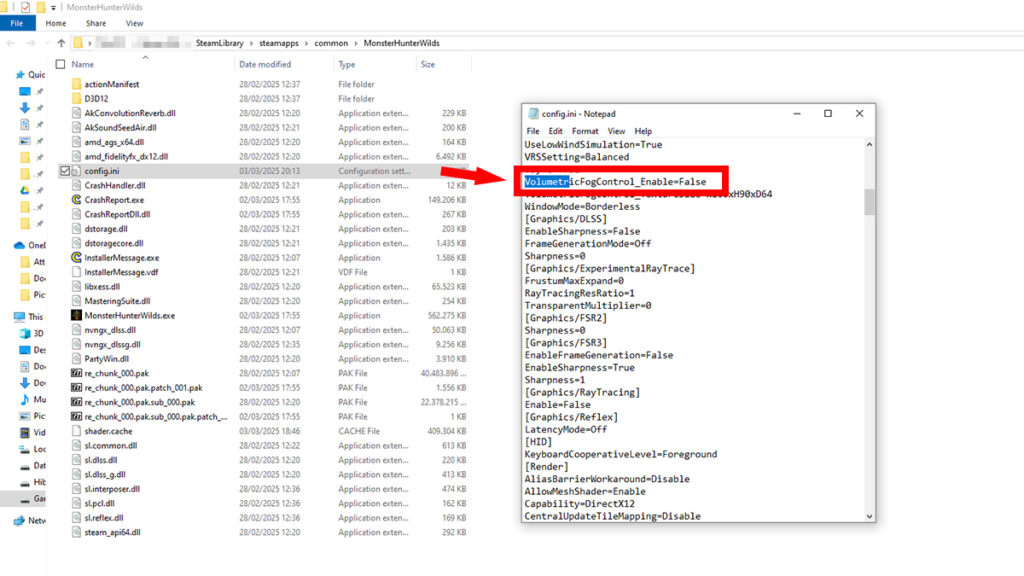
To forcefully disable or turn off volumetric fog, you need to manually modify the value in Monster Hunter Wilds‘s .INI file. Fortunately, navigating through the variables is really easy. If you know how to use Microsoft Word, you should be able to do this too:

  1. Open your Monster Hunter Wilds installation folder.
    • Steam Library > right-click and pick “Properties” > “Installed Files” tab > Click on the “Browse” button.
  2. Open the “config.ini” file using Notepad or other simple text editor of your choosing.
    • Simple text editors like Notepad and Notepad++ only save plain text without hidden formatting or use a file format that can break the file.
  3. Look for the “VolumetricFogControl_Enable=” option.
    • Use CTRL+F to open Notepad’s search bar to make looking up the option much easier.
  4. Change the “True” value to “False,” like in the image above.
  5. Save and close the edited file.

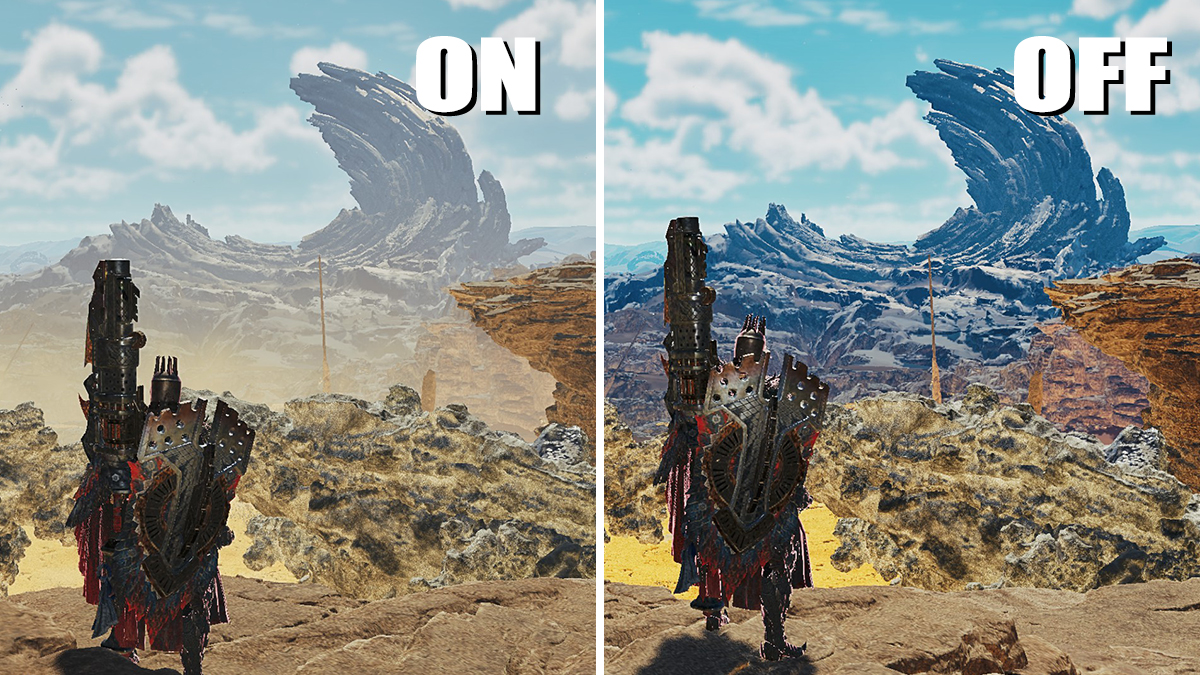
Based on our quick testing, turning off volumetric fog in Monster Hunter Wilds can net you 6-10 FPS boost. This is especially useful for those who’d rather play in native resolution and refuse to use upscaling like DLSS and FSR and frame generation. As seen in the image on top of the article, it also makes the color pop out more.

However, we suggest you set the Texture Quality to High. Otherwise, for some reason, distant textures and scenery would end up turning black. Said issue is very noticeable in Windward Plains and Iceshard Cliffs during Inclemency.

While we can’t tell you the exact reason why it happened, there is one possibility. There’s a chance that the game uses heavy volumetric fog to conceal far away low-quality textures. Disabling it might cause unintended visual glitches. If that bothers you — or you don’t mind seeing haze everywhere — consider keeping the setting or tweaking other graphics options instead.

Share. Facebook Twitter Pinterest Reddit Email
Sidharta F. Rasidi
  • Website

Related Articles

Which Monster Hunter Games Have Crossplatform Play and Cross-Save? Full List Explained

What Does Affinity Do In Monster Hunter Wilds? Explained & Essential Armor Skills

All Event Quest & Festival Ticket Rewards in MH Wilds

Add A Comment
Leave A Reply Cancel Reply

Features

Everything Coming to the Second Closed Beta of Monster Hunter Outlanders

Monster Hunter Outlanders Might Just Be the True MH Wilds We’ve All Been Waiting For

Is Monster Hunter Wilds Feasible on Switch 2? Let’s Talk Quick Math

MH Outlanders Will Have ‘Overpowered’ Gacha Partners, Unlimited Quest Timer & Retries, Playtesters Said

Popular Guides

Which Monster Hunter Games Have Crossplatform Play and Cross-Save? Full List Explained

Play with your friends across devices in these Monster Hunter games

Where to Get Commission Ticket in Monster Hunter Wilds

A gift from the New World

What Does The Diva Buffs Do in Monster Hunter Wilds? Explained

Soothe the soul, steel the body

Which Monster Hunter Games Have Crossplatform Play and Cross-Save? Full List Explained

April 28, 2026

Everything Coming to the Second Closed Beta of Monster Hunter Outlanders

April 2, 2026

MH Outlanders 2nd Beta Test Announcement Reveals Two New Adventurer Partners with Unseen Movesets Yet

March 29, 2026

What Does Affinity Do In Monster Hunter Wilds? Explained & Essential Armor Skills

© 2026 MonsterHunterHQ

MonsterHunterHQ is an unofficial Monster Hunter fan site and is in no way affiliated with Capcom, Tencent, Niantic, Inc., or FromSoftware Inc. Monster Hunter and the Monster Hunter logos are the property and trademarks of Capcom.
  • About Us
  • Meet Our Team
  • Editorial Guidelines
  • Terms of Use
  • Privacy Policy

Type above and press Enter to search. Press Esc to cancel.