Close Menu
  • News
  • Guides
    • Grounded 2
    • Wild Hearts
    • Monster Hunter Wilds
    • Monster Hunter World
    • Monster Hunter Stories 2
    • Monster Hunter Stories 3
    • Monster Hunter Now
    • Monster Hunter Rise
    • Monster Hunter Outlanders
  • Features
  • Guard Up Tool
Facebook X (Twitter) Instagram
Trending
  • HoYoverse Reveals Nodusfall Trailer, and It Definitely Looks Like Genshin’s Answer to Monster Hunter
  • The Best Steam Deck Settings for Monster Hunter Wilds
  • MH Wilds Is Steam Deck Verified Now, So How Well Does It Actually Run?
  • Monster Hunter Wilds Players Skeptical As It Gets Steam Deck Verified: ‘That Badge is a Borderline Scam’
  • Monster Hunter Wilds Unveils The Unexpected DIY Tool Behind Nu Udra’s Slimy, Squeaky Tentacle Sounds
  • Monster Hunter Now’s Summer Event Adds 24-Hour Hunts
  • Monster Hunter Wilds Reveals Freaky Details about Doshaguma’s Double Layers of Teeth
  • Nodusfall or The Weaver? Everything Revealed About HoYoverse’s Monster Hunter-Like Game So Far
Monster Hunter HQMonster Hunter HQ
  • News
  • Guides
    • Grounded 2
    • Wild Hearts
    • Monster Hunter Wilds
    • Monster Hunter World
    • Monster Hunter Stories 2
    • Monster Hunter Stories 3
    • Monster Hunter Now
    • Monster Hunter Rise
    • Monster Hunter Outlanders
  • Features
  • Guard Up Tool
Monster Hunter HQMonster Hunter HQ
Home » The Best Steam Deck Settings for Monster Hunter Wilds
The Best Steam Deck Settings for Monster Hunter Wilds
Image source: Monster Hunter HQ

The Best Steam Deck Settings for Monster Hunter Wilds

0
By Sidharta F. Rasidi on August 25, 2026 Gaming, Guides, Monster Hunter Wilds, PC, Steam

Monster Hunter Wilds might be Steam Deck Verified after Capcom spent more than a year optimizing the game. But getting this freeroaming hunting game to run smoothly still takes some tinkering. We proceed to test out different graphics options and run it through several Quests. Now, the Monster Hunter HQ team has found the best Monster Hunter Wilds Steam Deck settings for a consistent handheld experience.

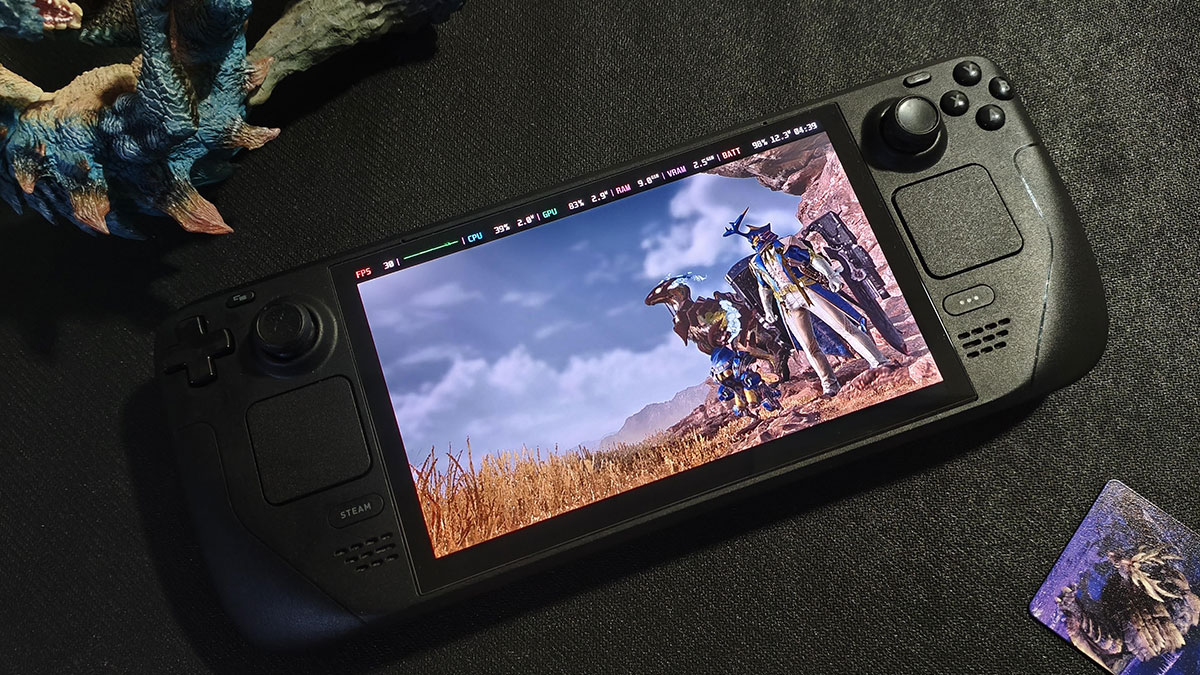
Smooth 30 FPS Steam Deck Settings for Monster Hunter Wilds
The Best Steam Deck Settings for Monster Hunter Wilds
Image source: Capcom via Monster Hunter HQ

According to our tests, even with Frame Generation turned on, Monster Hunter Wilds cannot reach 60 FPS on Steam Deck. Instead, it usually hovers around 40–50 FPS in most situations. We also found that enabling Frame Generation introduced noticeable input delay. Considering that, we suggest leaving it off. Instead, limit the framerate to 30 FPS, then use AMD FSR upscaling if you feel it’s necessary.

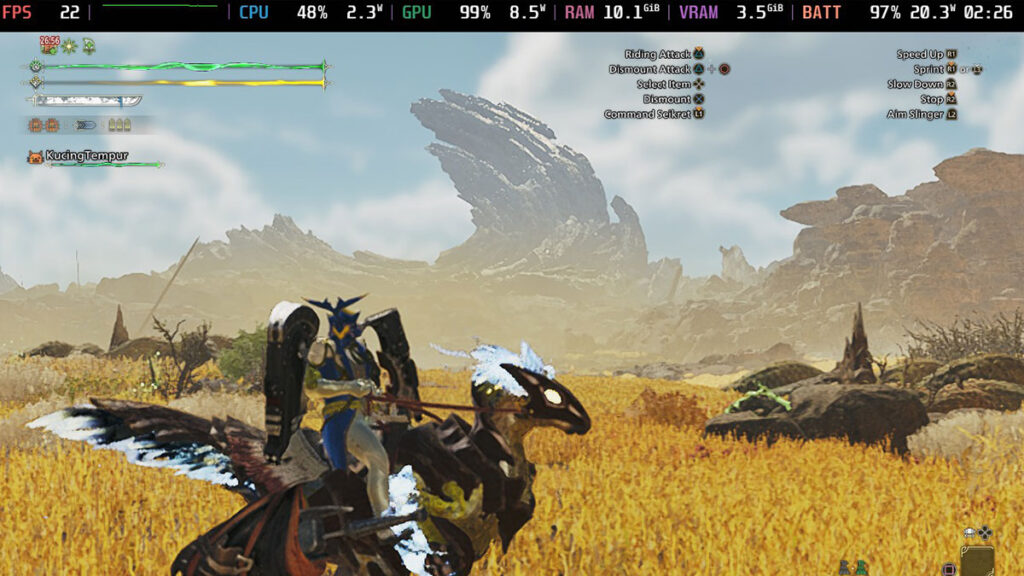
With these Monster Hunter Wilds Steam Deck settings, we were able to maintain a fairly consistent 30 FPS in most scenarios. There are some particularly demanding exceptions, such as the heavily foliaged areas of Scarlet Forest and Gogmazios‘ phase change. The infamous Windward Plains Area 8 was even rougher, cratering performance to around 20 FPS at its lowest.

Display Settings

Frame Rate30
Uncapped Frame RateCapped
HDR OutputDisable
V-SyncEnable

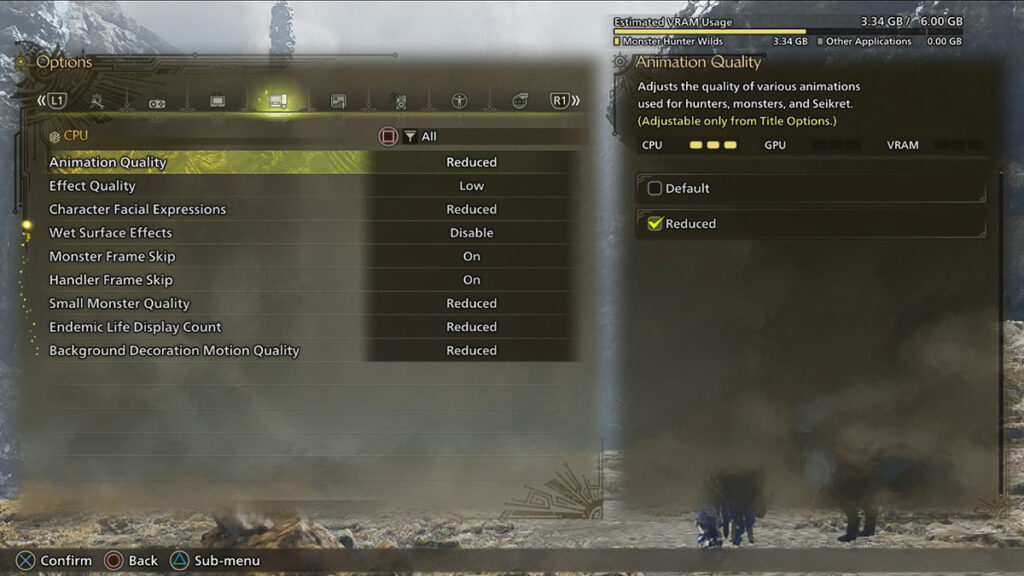
CPU Settings

Monster Hunter Wilds CPU Settings
Image source: Capcom via Monster Hunter HQ

Note that most CPU settings can only be changed from the main menu.

Animation QualityReduced
Effect QualityLow
Character Facial ExpressionReduced
Wet Surface EffectsDisable
Monster Frame SkipOn
Handler Frame SkipOn
Small Monster QualityReduced
Endemic Life Display CountReduced
Background Decoration Motion QualityReduced

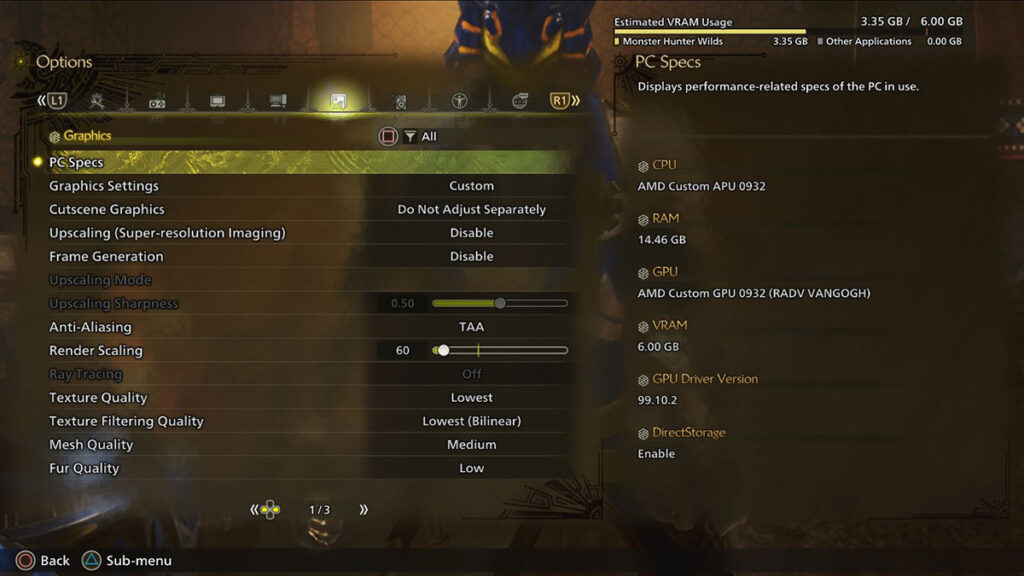
Graphics Settings

Monster Hunter Wilds graphics settings
Image source: Capcom via Monster Hunter HQ

We found that running the game at native resolution with a lower Render Scaling setting and Anti-Aliasing produced slightly better results than using Upscaling Mode set to Performance. The latter can squeeze out some extra performance, but the noticeably jaggier image wasn’t worth the trade-off.

Upscaling AMD FSR
Frame GenerationDisable
Upscaling ModePerformance
Upscaling Sharpness0.0
Anti-AliasingTAA, if not using Upscaling
Render Scaling60-65, if not using Upscaling
Texture QualityLowest
Texture Filtering QualityLowest (Bilinear)
Mesh QualityMedium
Fur QualityLow
Sky/Cloud QualitySimplified Display
Grass/Tree QualityLow
Grass/Tree SwayDisable
Foliage DensityLowest
Foliage and Snow CollisionOff
Wind Simulation QualityOff
Surface QualityLowest
Sand/Snow QualityLowest
Water EffectsDisable
Distortion EffectsEnable/Disable, doesn’t affect performance
Render DIstanceLow
Shadow QualityLowest
Distant Shadow QualityLow
Shadow DistanceNear
Ambient Light QualityLow
Contact ShadowsDisable
Ambient OcclusionOff
BloomOff
Motion BlurOff
Vignette EffectOn/Off, doesn’t affect performance
Screen Space ReflectionOff
SSSS ScatteringOff
Depth of FieldOff
Volumetric FogLowest
Variable Rate ShadingPerformance

Share. Facebook Twitter Pinterest Reddit Email
Sidharta F. Rasidi
  • Website

Related Articles

HoYoverse Reveals Nodusfall Trailer, and It Definitely Looks Like Genshin’s Answer to Monster Hunter

MH Wilds Is Steam Deck Verified Now, So How Well Does It Actually Run?

Monster Hunter Wilds Players Skeptical As It Gets Steam Deck Verified: ‘That Badge is a Borderline Scam’

Add A Comment
Leave A Reply Cancel Reply

Features

Capcom’s New Monster Hunter Wilds Demo Arrives With Old PC Questions Still Hanging Around

10 Monsters We’d Love to See in Monster Hunter Wilds: Ascendance

Everything Coming to the Second Closed Beta of Monster Hunter Outlanders

Monster Hunter Outlanders Might Just Be the True MH Wilds We’ve All Been Waiting For

Popular Guides

Monster Hunter Wilds: Rarity 6 Special Items ‘Explorer of the Eastlands’ Achievement Guide

The proof that you’ve explored every nook and cranny of the Forbidden Lands

How Does Convert Element Skill Actually Work in Monster Hunter Wilds? Explained

Move over Frenzy, there’s a new kid in the wilds

Gogmazios Full Monster Guide (Strategies, Loot Table, Craftable Items) for Monster Hunter Wilds

Bring down the Specter of War

HoYoverse Reveals Nodusfall Trailer, and It Definitely Looks Like Genshin’s Answer to Monster Hunter

August 25, 2026

The Best Steam Deck Settings for Monster Hunter Wilds

August 22, 2026

MH Wilds Is Steam Deck Verified Now, So How Well Does It Actually Run?

August 21, 2026

Monster Hunter Wilds Players Skeptical As It Gets Steam Deck Verified: ‘That Badge is a Borderline Scam’

© 2026 MonsterHunterHQ

MonsterHunterHQ is an unofficial Monster Hunter fan site and is in no way affiliated with Capcom, Tencent, Niantic, Inc., or FromSoftware Inc. Monster Hunter and the Monster Hunter logos are the property and trademarks of Capcom.
  • About Us
  • Meet Our Team
  • Editorial Guidelines
  • Terms of Use
  • Privacy Policy

Type above and press Enter to search. Press Esc to cancel.