


Monster Hunter Wilds has spent the past year trying to fix both its PC performance and its reputation. December’s TU4 update moved the needle a bit, but now Capcom has rolled out a Steam-focused performance patch on January 28. Positive reviews are starting to stack up; still, is this finally the update that makes the game run the way it always should have? The Monster Hunter HQ team will put Wilds‘ January performance patch to the test.
Our Monster Hunter Wilds Setup
Just like the previous TU4 comparison, the testing was done using the following specs:
- CPU: Ryzen 7 5700X3D.
- GPU: RX 7600 XT 16 GB.
- RAM: 16 GB.
- Storage: 500 GB SSD.
- Resolution: 1920×1080.
- Graphics Preset: Medium.
- Upscaling: Disabled; no FSR and Frame Generation.
- HD Texture Pack: Disabled.
To mirror Capcom’s gameplay stress, we ran the game through similar High Rank Investigations and Quests. Which are Arkveld in Sandtide Windward Plains, Lagiacrus in Plenty Scarlet Forest, and Nu Udra in Firespring Oilwell Basin.
Before: Performance During December 2025’s Title Update 4

After TU4, performance did improve — but only a little. In Windward Plains during Sandtide Inclemency, the average frame rate was 48 FPS. Oilwell Basin during Firespring hovered around 45 FPS, while Scarlet Forest at Plenty averaged 44 FPS, with regular dips into the high 30s. Overall, TU4 delivered about a 9.1% performance boost. That was slightly better than what Capcom had promised, but still nowhere near what most Hunters would callcomfortable.
There were a few technical wins. GPU VRAM usage dropped from roughly 7.8 GB to about 6.8 GB, which helped a bit. CPU performance, however, was still all over the place, with usage occasionally spiking up to 113% in busy scenes.
After: Performance Following January 2026’s Steam Patch

(Click to expand)

(Click to expand)
(Click to expand)
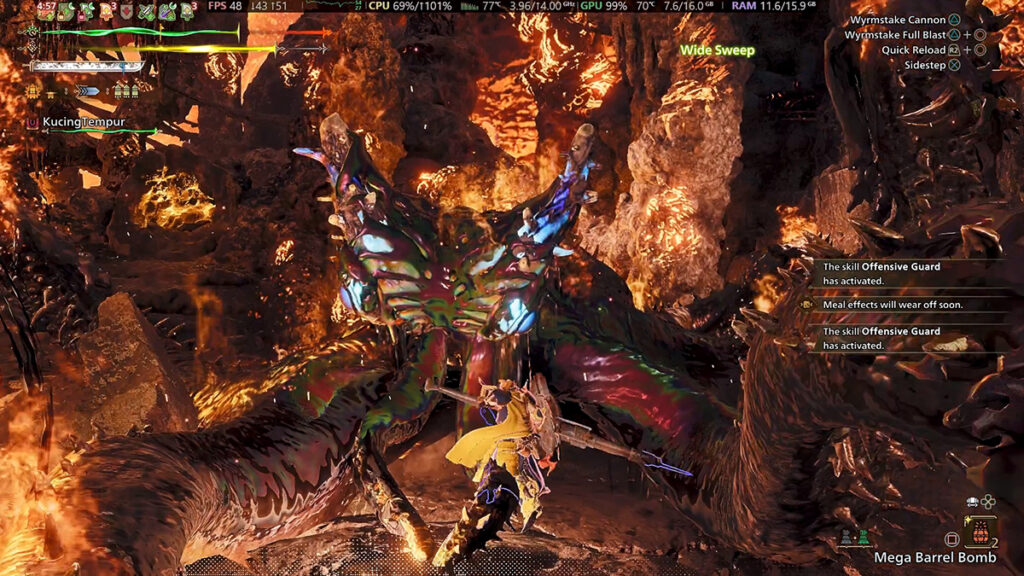
The improvement is immediately noticeable! While Monster Hunter Wilds still doesn’t hold a perfect, stable 60 FPS on Medium with our specs, both framerate and overall stability are significantly better.
In Windward Plains, native 1080p performance now peaks at 60 FPS when chasing Arkveld through Areas 12, 13, and 16. Something we never saw the whole year we played the game — at least when not using upscaling and FSR. Still, when the screen fills up with particle effects and Small Monsters, the framerate can still dip to around 43 FPS, averaging 49 FPS overall.
Scarlet Forest averaged 47 FPS, with peaks at 53 and lows around 44. Dense forest areas remain demanding, but when you’re in open areas like Area 18, the game runs noticeably smoother. The swings and hitches from TU4 seem mostly gone.
Oilwell Basin shows a similar pattern. Average FPS sits at 47, with peaks up to 55. Heavy explosions can still drag performance down to 36 FPS, but those drops are far less frequent. Most of the time, the lows sit in the 44-46 FPS range.
System usage also looks healthier. GPU usage peaked at around 77% across all three maps, while CPU usage topped out at 98% during the most intense moments. Usually, it hovers closer to around 80%, but compared to December’s high CPU spikes, this is an obvious improvement.
The real game-changer, though, is an even lower Custom Low settings — thanks to the new CPU-related settings menu. Keeping textures on Medium while dropping most of the graphics and CPU options finally lets Monster Hunter Wilds hover around a somewhat steady 60 FPS! We still see the occasional dip when fights get especially chaotic, but for the first time, the PC version feels genuinely comfortable to play. Well, as long as you don’t mind turning everything off. Maybe anti-aliasing can stay, though.
Verdict for Monster Hunter Wilds January 2026 Performance Patch
January’s patch doesn’t magically fix everything, but it’s easily the most impactful performance update Monster Hunter Wilds has received on PC so far. Capcom has also already confirmed that additional CPU and GPU optimizations are planned for February. If those improvements land as promised, the PC version may finally be closing in on the performance baseline Hunters were hoping for since launch.

2 Comments
Pingback: MH Wilds Is Steam Deck Verified Now, So How Well Does It Actually Run? - Monster Hunter HQ
Pingback: Analysts Expect Monster Hunter Wilds Sales to Bounce Back With Switch 2 Release: 'Major Slowdown Unlikely' - Monster Hunter HQ