


Close Menu
  • News
  • Guides
    • Grounded 2
    • Wild Hearts
    • Monster Hunter Wilds
    • Monster Hunter World
    • Monster Hunter Stories 2
    • Monster Hunter Stories 3
    • Monster Hunter Now
    • Monster Hunter Rise
    • Monster Hunter Outlanders
  • Features
  • Guard Up Tool
Facebook X (Twitter) Instagram
Trending
  • Despite Being the Bane of Many Hunters, Players Still Want to See Bazelgeuse in Monster Hunter Wilds
  • HoYoverse Reveals Nodusfall Trailer, and It Definitely Looks Like Genshin’s Answer to Monster Hunter
  • The Best Steam Deck Settings for Monster Hunter Wilds
  • MH Wilds Is Steam Deck Verified Now, So How Well Does It Actually Run?
  • Monster Hunter Wilds Players Skeptical As It Gets Steam Deck Verified: ‘That Badge is a Borderline Scam’
  • Monster Hunter Wilds Unveils The Unexpected DIY Tool Behind Nu Udra’s Slimy, Squeaky Tentacle Sounds
  • Monster Hunter Now’s Summer Event Adds 24-Hour Hunts
  • Monster Hunter Wilds Reveals Freaky Details about Doshaguma’s Double Layers of Teeth
Monster Hunter HQMonster Hunter HQ
  • News
  • Guides
    • Grounded 2
    • Wild Hearts
    • Monster Hunter Wilds
    • Monster Hunter World
    • Monster Hunter Stories 2
    • Monster Hunter Stories 3
    • Monster Hunter Now
    • Monster Hunter Rise
    • Monster Hunter Outlanders
  • Features
  • Guard Up Tool
Monster Hunter HQMonster Hunter HQ
Home » Where to Find the Monster Hunter Wilds Save File Location on PC
Where to Find the Monster Hunter Wilds Save File Location on PC
Image source: Capcom

Where to Find the Monster Hunter Wilds Save File Location on PC

0
By Sidharta F. Rasidi on April 4, 2025 Gaming, Guides, Monster Hunter Wilds, PC

If you’re diving deep into Monster Hunter Wilds, knowing where your save file is stored can be a lifesaver. Maybe you want to back up progress or troubleshoot a pressing issue. After all, seeing error codes flash and losing thousands of hours of hunting data is every Hunter’s nightmare. Thus, understanding where your game stores vital information can help prevent unexpected setbacks. Thankfully, finding the necessary Monster Hunter Wilds files and folder on your PC only takes a few steps.

Monster Hunter Wilds PC Save File Location
Monster Hunter Wilds PC Save File Location
Image source: Microsoft via Monster Hunter HQ

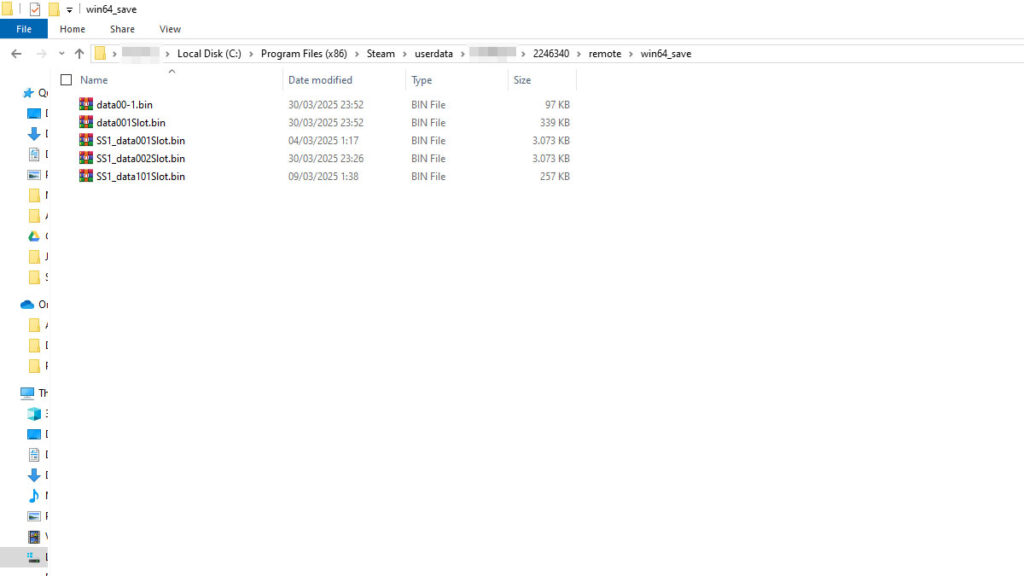
Your Monster Hunter Wilds save file should be stored in the following directory:

Windows: [Steam installation folder]\Steam\userdata\[Steam ID]\2246340\remote\win64_save
Linux: [SteamLibrary folder]/steamapps/compatdata/2246340/pfx/

By default, Steam is installed in “C:\Program Files (x86)” if you’re using Windows. In case you are looking for the “3065170\remote\win64_save,” the 3065170 was used for the Open Beta save data. The full release version uses the 2246340 folder ID instead.

If you have more than one account installed on your PC, though, you will need to find your unique Steam ID for the folder. You can do so by using a SteamID converter, such as the SteamDB Calculator. Then follow simply these steps:

  1. Copy your Steam profile URL from your browser or Steam client.
  2. Paste it into the SteamDB Calculator and press Enter.
  3. Look for Steam3 ID: (Letter:Number:Number) in the results.
  4. The last number in your Steam3 ID is your unique SteamID which also corresponds to your personal save folder.
Monster Hunter Wilds PC Save File Location
Image source: Valve via Monster Hunter HQ

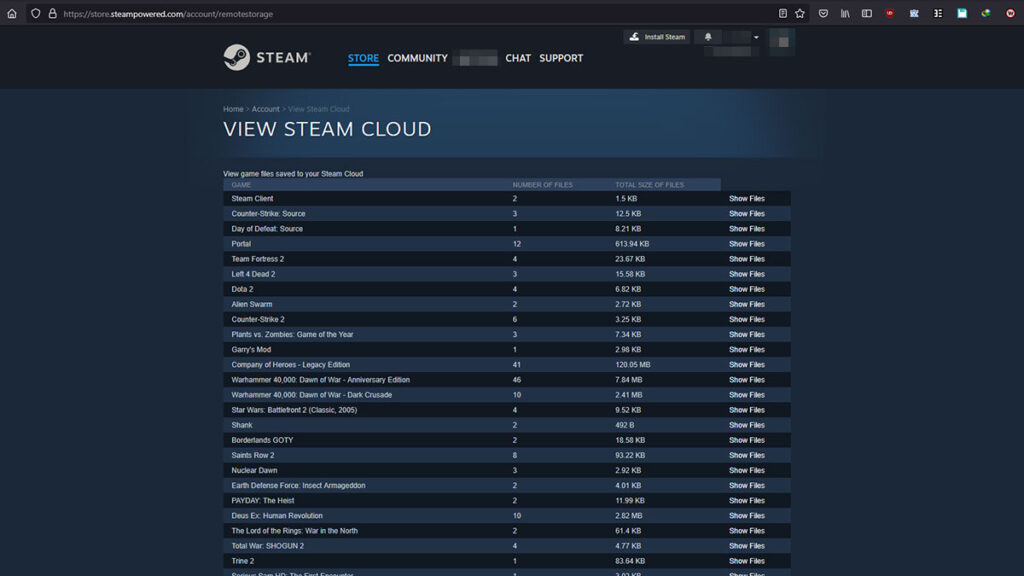
If you encounter issues with conflicting Cloud Saves, you can manually check and manage them through Steam’s Remote Storage. This page will list registered Cloud Saves for all games that support the feature in your Steam Library. The Cloud Save option itself can be enabled and disabled in Steam > Settings > Cloud > Enable Steam Cloud.

Share. Facebook Twitter Pinterest Reddit Email
Sidharta F. Rasidi
  • Website

Related Articles

Despite Being the Bane of Many Hunters, Players Still Want to See Bazelgeuse in Monster Hunter Wilds

HoYoverse Reveals Nodusfall Trailer, and It Definitely Looks Like Genshin’s Answer to Monster Hunter

The Best Steam Deck Settings for Monster Hunter Wilds

Add A Comment
Leave A Reply Cancel Reply

Features

Capcom’s New Monster Hunter Wilds Demo Arrives With Old PC Questions Still Hanging Around

10 Monsters We’d Love to See in Monster Hunter Wilds: Ascendance

Everything Coming to the Second Closed Beta of Monster Hunter Outlanders

Monster Hunter Outlanders Might Just Be the True MH Wilds We’ve All Been Waiting For

Popular Guides

How to Force Disable Volumetric Fog in Monster Hunter Wilds

More frames, less haze

Essential Mods to Massively Improve Your PC Monster Hunter Wilds Performance

Turn that low, unstable framerate upside-down

Did TU4 Actually Fix Monster Hunter Wilds’ Performance? Answered

January update will fix it, trust the plan!

Despite Being the Bane of Many Hunters, Players Still Want to See Bazelgeuse in Monster Hunter Wilds

August 25, 2026

HoYoverse Reveals Nodusfall Trailer, and It Definitely Looks Like Genshin’s Answer to Monster Hunter

August 25, 2026

The Best Steam Deck Settings for Monster Hunter Wilds

August 22, 2026

MH Wilds Is Steam Deck Verified Now, So How Well Does It Actually Run?

© 2026 MonsterHunterHQ

MonsterHunterHQ is an unofficial Monster Hunter fan site and is in no way affiliated with Capcom, Tencent, Niantic, Inc., or FromSoftware Inc. Monster Hunter and the Monster Hunter logos are the property and trademarks of Capcom.
  • About Us
  • Meet Our Team
  • Editorial Guidelines
  • Terms of Use
  • Privacy Policy

Type above and press Enter to search. Press Esc to cancel.