

Close Menu
  • News
  • Guides
    • Grounded 2
    • Wild Hearts
    • Monster Hunter Wilds
    • Monster Hunter World
    • Monster Hunter Stories 2
    • Monster Hunter Stories 3
    • Monster Hunter Now
    • Monster Hunter Rise
    • Monster Hunter Outlanders
  • Features
  • Guard Up Tool
Facebook X (Twitter) Instagram
Trending
  • Does Monster Hunter Outlanders Support Bluetooth Controllers? Answered
  • Capcom Wants Monster Hunter Wilds to Surpass World’s Sales Amid Expansion Announcement and Demo Launch
  • Monster Hunter Wilds vs World Comparisons: Which Hunting Game Should You & Your Friends Buy?
  • Capcom’s New Monster Hunter Wilds Demo Arrives With Old PC Questions Still Hanging Around
  • Monster Hunter Wilds Datamine Suggests Switch 2 Port Targets Up to 1440p, 40FPS
  • Monster Hunter Wilds Finally Lets You Play All Event Quests Offline
  • Monster Hunter: World Surpasses 30 Million Copies Sold
  • Palworld 1.0 Release Goes Beyond Pokémon, It Now Has Monster Hunter-Looking Pals Too
Monster Hunter HQMonster Hunter HQ
  • News
  • Guides
    • Grounded 2
    • Wild Hearts
    • Monster Hunter Wilds
    • Monster Hunter World
    • Monster Hunter Stories 2
    • Monster Hunter Stories 3
    • Monster Hunter Now
    • Monster Hunter Rise
    • Monster Hunter Outlanders
  • Features
  • Guard Up Tool
Monster Hunter HQMonster Hunter HQ
Home » How to Change the Time of Day in Monster Hunter Wilds
How to Change Time of Day in Monster Hunter Wilds
Image source: Vexels, Capcom via Monster Hunter HQ

How to Change the Time of Day in Monster Hunter Wilds

0
By Sidharta F. Rasidi on March 9, 2025 Game Guides, Gaming, Monster Hunter Wilds, PC, PlayStation, Xbox

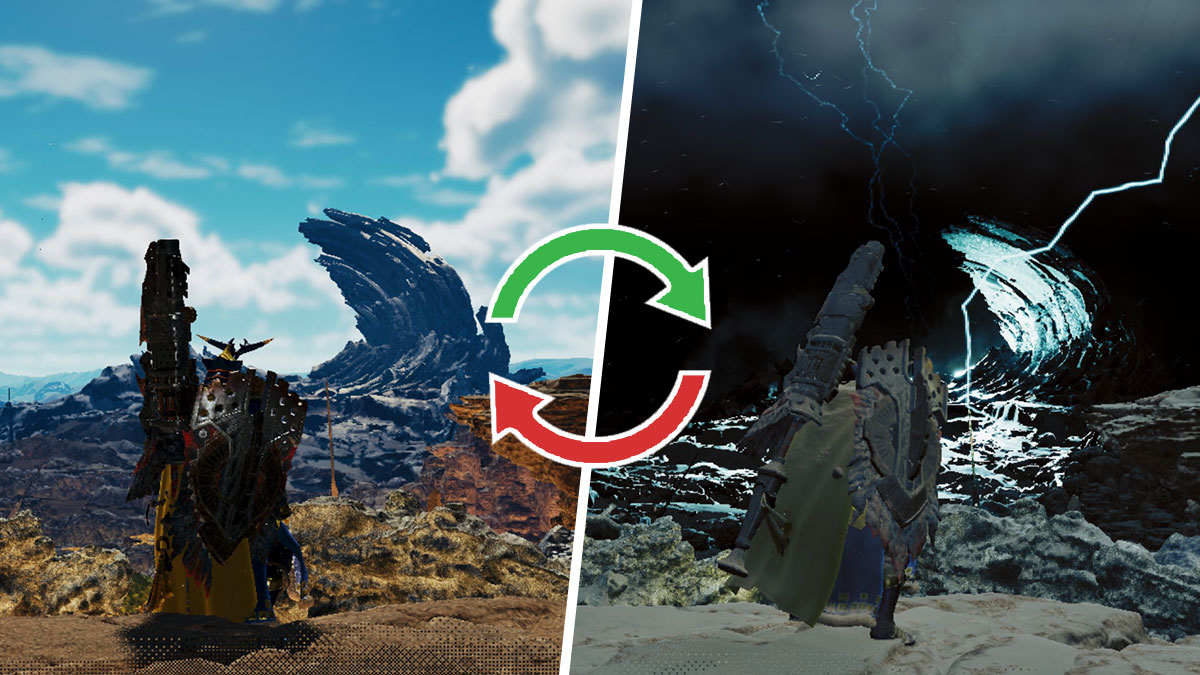
Unlike the previous games, this entry features more than just a simple day-night cycle. The game offers dynamic weather and shifting seasons, both of which will directly impact your hunts and resource availability. While it makes the hunting vibe much more varied, it complicates things when you want to catch rare Endemic Life like the Sandstar, for example. You’ll be happy to know that Monster Hunter Wilds does offer a way to change and control time and weather.

To adjust the time of day or weather, you’ll need to access the “Rest” menu in the “BBQ Menu” tab through one of three methods. This can be done Inside your tent at a Base Camp or Pop-up Camp and via the Portable BBQ Grill.

However, keep in mind that playing around with the power to control the passage of time comes at a cost. Changing these settings will require you to spend a whooping 300 Guild Points per adjustment. You also need to reach High Rank first before this feature is unlocked.

The menu to Rest and change time in Monster Hunter Wilds
Image source: Capcom via Monster Hunter HQ

Once you’re in the menu, you can change the Environment or season and in-game time to your liking:

Environment options:

  • Plenty: Bright and sunny.
  • Fallow : Overcast and dreary.
  • Inclemency: Harsh weather conditions, most Endemic Life and villagers won’t be available.

Time options:

  • Morning.
  • Daytime.
  • Evening.
  • Nighttime.

Knowing how to rest and change the time of day in Monster Hunter Wilds is important. Time and seasons will affect villager activities and their trading stock, Endemic Life spawns, and the arrival of the Support Ship.

Nevertheless, it will only work if you’re playing in Single Player Online mode. The changes won’t affect others if you’re in a multiplayer lobby. The menu is not accessible if you’re in Environmental Links. There’s also a specific moment during the main storyline quest where you won’t be able to change the time of day.

Share. Facebook Twitter Pinterest Reddit Email
Sidharta F. Rasidi
  • Website

Related Articles

Does Monster Hunter Outlanders Support Bluetooth Controllers? Answered

Capcom Wants Monster Hunter Wilds to Surpass World’s Sales Amid Expansion Announcement and Demo Launch

Monster Hunter Wilds vs World Comparisons: Which Hunting Game Should You & Your Friends Buy?

Add A Comment
Leave A Reply Cancel Reply

Features

Capcom’s New Monster Hunter Wilds Demo Arrives With Old PC Questions Still Hanging Around

10 Monsters We’d Love to See in Monster Hunter Wilds: Ascendance

Everything Coming to the Second Closed Beta of Monster Hunter Outlanders

Monster Hunter Outlanders Might Just Be the True MH Wilds We’ve All Been Waiting For

Popular Guides

How Mushroomancer Works & Its Effects in Monster Hunter Wilds

Forage and fight, at the same time

Seregios Full Monster Guide (Strategies, Loot Table, Craftable Items) for Monster Hunter Wilds

Pinecone hunting is now in season

Monster Hunter Stories 3: All Confirmed Details and Everything to Know

Read and learn before you start Riding

Does Monster Hunter Outlanders Support Bluetooth Controllers? Answered

August 6, 2026

Capcom Wants Monster Hunter Wilds to Surpass World’s Sales Amid Expansion Announcement and Demo Launch

August 6, 2026

Monster Hunter Wilds vs World Comparisons: Which Hunting Game Should You & Your Friends Buy?

August 5, 2026

Capcom’s New Monster Hunter Wilds Demo Arrives With Old PC Questions Still Hanging Around

© 2026 MonsterHunterHQ

MonsterHunterHQ is an unofficial Monster Hunter fan site and is in no way affiliated with Capcom, Tencent, Niantic, Inc., or FromSoftware Inc. Monster Hunter and the Monster Hunter logos are the property and trademarks of Capcom.
  • About Us
  • Meet Our Team
  • Editorial Guidelines
  • Terms of Use
  • Privacy Policy

Type above and press Enter to search. Press Esc to cancel.