

Close Menu
  • News
  • Guides
    • Grounded 2
    • Wild Hearts
    • Monster Hunter Wilds
    • Monster Hunter World
    • Monster Hunter Stories 2
    • Monster Hunter Stories 3
    • Monster Hunter Now
    • Monster Hunter Rise
    • Monster Hunter Outlanders
  • Features
  • Guard Up Tool
Facebook X (Twitter) Instagram
Trending
  • How to Reroll and Edit Character in Monster Hunter Outlanders
  • Can You Play Monster Hunter Outlanders on Emulators? Answered
  • Complete Adventurers Tier List for Monster Hunter Outlanders
  • 7 Best Things to Do Daily in Monster Hunter Outlanders
  • Monster Hunter Outlanders: Best Settings to Change for a Classic MH Experience
  • How to Use Photo Mode in Monster Hunter Outlanders
  • How to Get Layered Armor and Weapons in Monster Hunter Outlanders
  • Is There a Gathering Hall in Monster Hunter Outlanders? Answered
Monster Hunter HQMonster Hunter HQ
  • News
  • Guides
    • Grounded 2
    • Wild Hearts
    • Monster Hunter Wilds
    • Monster Hunter World
    • Monster Hunter Stories 2
    • Monster Hunter Stories 3
    • Monster Hunter Now
    • Monster Hunter Rise
    • Monster Hunter Outlanders
  • Features
  • Guard Up Tool
Monster Hunter HQMonster Hunter HQ
Home » How to Reroll and Edit Character in Monster Hunter Outlanders
How to Reroll and Edit Character in Monster Hunter Outlanders
Image source: Capcom, TiMi Studio via Monster Hunter HQ

How to Reroll and Edit Character in Monster Hunter Outlanders

0
By Sidharta F. Rasidi on October 28, 2026 Gaming, Guides, Mobile, Monster Hunter Outlanders

Pulling the meta or your favorite Adventurers might take a few tries, especially if luck isn’t on your side. Thankfully, you can reroll your Monster Hunter Outlanders account for another shot at the characters you want. However, the process takes some time, and there are a few things you should know before starting. Here’s how to reroll for starting Adventurers in Monster Hunter Outlanders and save time on character creation along the way.

How to Reset Your Account and Reroll in Monster Hunter Outlanders
How to Reroll and Edit Character in Monster Hunter Outlanders
Image source: Capcom, TiMi Studio via Monster Hunter HQ

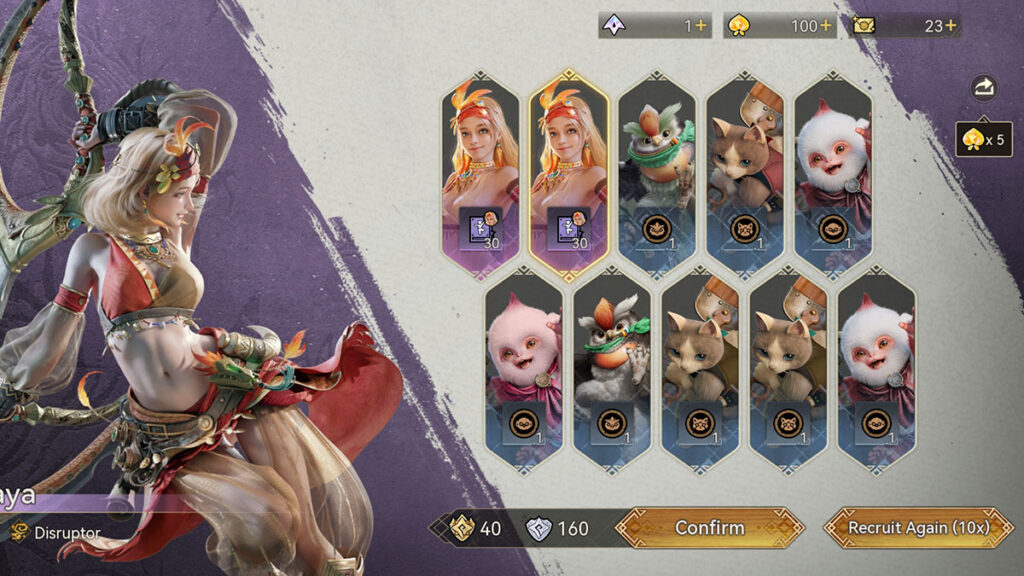
Before starting, make sure to play using a Guest account and don’t link it to Level Infinite Pass or another platform account. Linked accounts store your progress on the server, meaning uninstalling the game won’t reset your Hunter’s progress. Afterward, follow these steps for rerolling:

  1. Start Monster Hunter Outlanders using a Guest account.
  2. Play through the tutorial until Raya joins your party and helps you defeat a Kulu-Ya-Ku in the Giantwood Locale.
  3. Once that’s done, complete “Tutorial ★1 – Where Adventurers Gather.”
  4. After completing the quest, you’ll unlock the Adventurer Recruitment menu.
  5. Use your available Contract to try getting your desired Adventurers.
  6. If you’re unhappy with the results, uninstall the game and delete the local data. Afterward, reinstall through the App or Play Store and start over with a fresh Guest account.

However, do note that it takes around 20 minutes to unlock the Adventurer Recruitment menu, even when skipping cutscenes. After all, some tutorial sections still require you to walk around and complete objectives manually, so rerolling can be rather time-consuming.

Keep in mind that deleting a Guest account’s local data can permanently erase its progress. Consider linking your account to secure your progress once you’re satisfied with your recruitment results.

How to Change Your Hunter’s Name and Appearance After Rerolling
How to Change Your Hunter's Name and Appearance After Rerolling
Image source: Capcom, TiMi Studio via Monster Hunter HQ

Since rerolling takes a lot of time, recreating your detailed Fated Adventurer from scratch every time can feel tedious. But you can actually still change your character’s name and appearance later. However, do note that both options come with a catch.

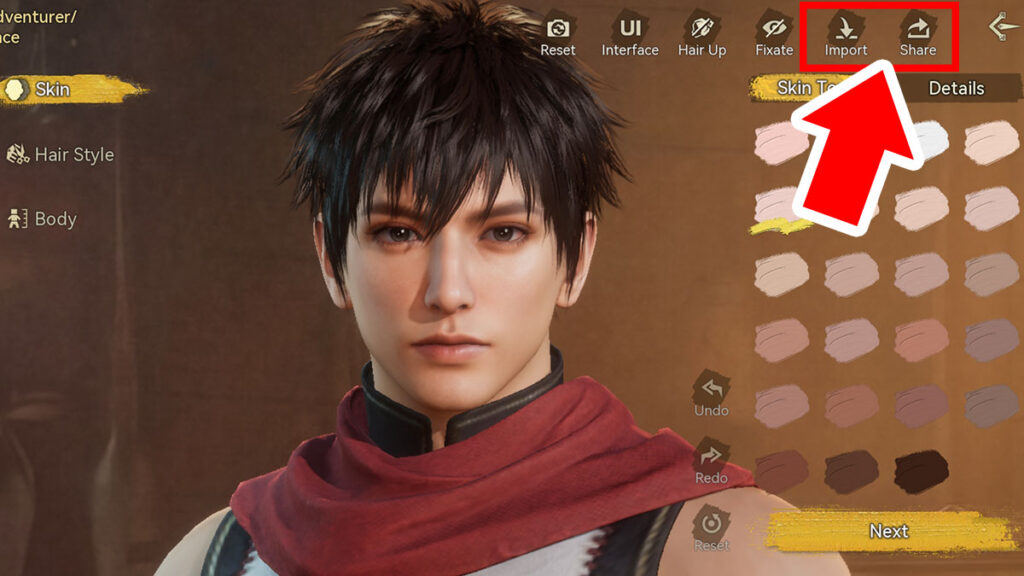
To change your character’s name, open Profile > Settings > Name. You’ll need a Rename Card, and you can only change your name once every 30 days. Meanwhile, you can edit your character’s appearance through Profile > Custom > Appearance > Edit. It requires one Appearance Voucher each time you want to make changes.

You can also save your Hunter’s current look using the Appearance Loadout feature. During character creation, pressing the Share button lets you save your character’s Appearance ID. You can then reuse that code to recreate that look later through the Import option.

Share. Facebook Twitter Pinterest Reddit Email
Sidharta F. Rasidi
  • Website

Related Articles

Can You Play Monster Hunter Outlanders on Emulators? Answered

Complete Adventurers Tier List for Monster Hunter Outlanders

7 Best Things to Do Daily in Monster Hunter Outlanders

Add A Comment
Leave A Reply Cancel Reply

Features

Capcom’s New Monster Hunter Wilds Demo Arrives With Old PC Questions Still Hanging Around

10 Monsters We’d Love to See in Monster Hunter Wilds: Ascendance

Everything Coming to the Second Closed Beta of Monster Hunter Outlanders

Monster Hunter Outlanders Might Just Be the True MH Wilds We’ve All Been Waiting For

Popular Guides

Monster Hunter Wilds: All Error Codes and Solutions

Get back to hunting again in no time

Gogmazios, Gacha Charms, and More: 7 Things You Should Expect in MH Wilds Title Update 3

TUs adding two or more monsters again would be great, honestly

All Event Quest & Festival Ticket Rewards in MH Wilds

Get the gear while they’re hot

How to Reroll and Edit Character in Monster Hunter Outlanders

October 28, 2026

Can You Play Monster Hunter Outlanders on Emulators? Answered

October 28, 2026

Complete Adventurers Tier List for Monster Hunter Outlanders

October 28, 2026

7 Best Things to Do Daily in Monster Hunter Outlanders

© 2026 MonsterHunterHQ

MonsterHunterHQ is an unofficial Monster Hunter fan site and is in no way affiliated with Capcom, Tencent, Niantic, Inc., or FromSoftware Inc. Monster Hunter and the Monster Hunter logos are the property and trademarks of Capcom.
  • About Us
  • Meet Our Team
  • Editorial Guidelines
  • Terms of Use
  • Privacy Policy

Type above and press Enter to search. Press Esc to cancel.