


Monster Hunter Wilds’ performance, especially on PC, has been under scrutiny since launch. Not long after, Title Update 4 was announced to be a meaningful step toward improving it. Capcom highlighted optimization and smoother gameplay across several areas, raising hopes that it could address long-standing issues. Monster Hunter HQ has done a quick testing pre and post-TU4, comparing it with Capcom’s own promises. The results? TU4 shows clear improvements, but not as wild as many players were expecting.
The Short Answer and What Capcom Says TU4 Improves
The short answer is: No, TU4 does not fix Monster Hunter Wilds’ PC performance issues. Mid-range systems still need DLSS or FSR enabled to approach 60 FPS, and even then, frame drops remain common. Native resolution performance is still inconsistent, indicating the main CPU or texture uncompression bottleneck hasn’t been fully resolved. However, the long answer is more complicated than that.
Capcom’s official stance on this hinges on these two comparison videos:
Intel + Nvidia Spec:
- CPU: Intel Core i5-10400
- GPU: NVIDIA GeForce RTX 2060 Super (VRAM 8GB)
- Resolution: 1080p (Upscaled) *NVIDIA DLSS: Performance
- Graphics Settings: Medium
AMD Spec:
- CPU: AMD Ryzen 5 5600X
- GPU: AMD Radeon RX 6600(VRAM 8GB)
- Resolution: 1080p (Upscaled) *AMD FSR: Performance
- Graphics Settings: Medium
Officially, Capcom said that Windward Plains remains the heaviest zone pre-TU4. With Frame Generation disabled, framerates hover around 40 FPS during Inclemency. After TU4, the company claims FPS generally exceeds 40, but it avoids promising anything close to a stable 60. In Scarlet Forest and Oilwell Basin, Capcom reports roughly 5% or higher framerate improvements.
Monster Hunter HQ Team’s Findings
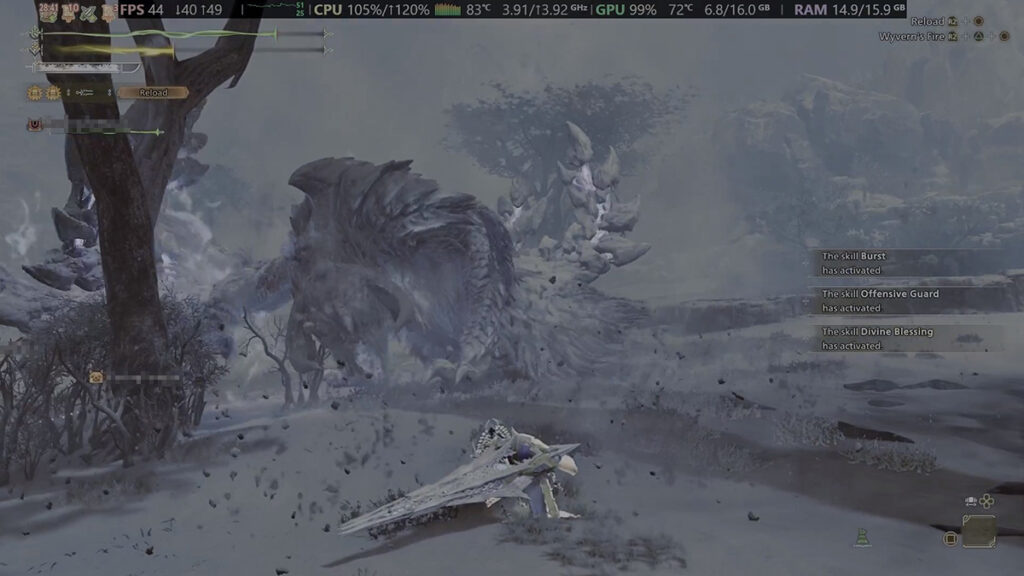

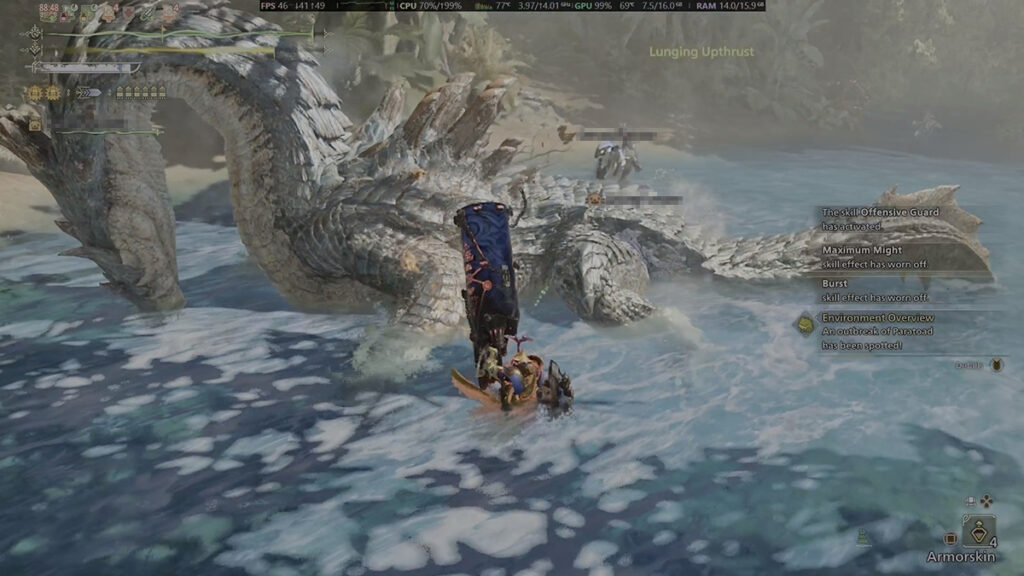
Our own testing environment was done on an AMD-based rig:
- Ryzen 7 5700X3D 16 GB GPU.
- RX 7600 XT CPU.
- 16GB of RAM.
- 500 GB SSD.
- No HD Texture Pack.
- While running native resolution 1920x1080p at Medium settings without FSR upscaling and Frame Generation.
- We also tried to use Investigations with the closest conditions to Capcom’s videos.
We found that in Windward Plains during Sandtide Inclemency against Tempered Arkveld, average FPS before TU4 sat at 44. With peaks at 56 and drops to 39 during intense lightning and particle effects. After TU4, the same scenario averaged 48 FPS, a roughly 9.1% improvement, which slightly exceeds Capcom’s stated gains but still falls well short of smooth gameplay.
We also noticed slightly lower GPU VRAM usage, dropping from 7.8 to around 6.8 GB, while CPU usage occasionally spiked as high as 113%.
Oilwell Basin and Scarlet Forest Investigations tell a similar story. Before TU4, Basin averaged around 45 FPS during Firespring, while Forest at Plenty averaged 44 FPS with drops to 37 in denser areas. Post-TU4 performance was consistently higher, but it still fluctuated.
In Oilwell Basin, moment-to-moment FPS could swing by 8 to 12 FPS. It all depends on particle density, camera direction, and enemy effects. This is most notable in Nu Udra’s lair at Area 17 — staring at the rock wall can push performance past 54 FPS, while facing the lava part quickly drags it back down.
Scarlet Forest showed a similar pattern, where open or enclosed areas like Area 18 and 19 might sit in the 50s, then dip into the 39-42 once you get back to the actual forest. Those swings mean TU4 clearly raises the floor, but it doesn’t stabilize the ceiling.
That’s Not All, and What the Community Says About TU4 Performance
Nevertheless, where TU4 genuinely shines is stability. Random stutters and unexplained frame drops are largely gone, especially noticeable when running loops in the Gathering Hub. Before TU4, completing a full circle almost always caused a hitch, but that behavior has disappeared entirely. Enclosed areas like the Jin Dahaad arena also feel significantly smoother.
Shader compilation has also seen a meaningful improvement. What previously took over 7 seconds on startup now completes in roughly 2 seconds. Do note that there were two brief full-second freezes immediately after installing TU4, but they never reappeared during extended testing.
Gamers’ Verdict on TU4 Performance Update

Community reactions are mixed, but many agree the game feels better — or at least smoother than before:
Performance is very noticeably better on my rig (3070ti and 5800x) and on the same settings as before the update (basically everything on high besides ambient lighting and shadows on like medium) my vram usage has dropped by over a gigabyte. I don’t know if it’ll be enough for lower end systems, but it’s 100% better
my laptop can run this on High now. before this, setting it on High would make the VRAM usage bar goes all the way to the red zone. i also already tested it by fighting AT Nu Udra with all its fiery effects. 90% of the time it ran smoothly above 50fps.
I see no performance improvement at all, 7800x3d and rtx 5090, the only thing i noticed was that the CPU was almost maxed for the first 5/10 minutes of Gameplay probably caching shaders, then it goes back to normal usage, performance i noticed zero diff
After shader compilation is done (it now happens beyond the compilation screen), i have noticed a much stabler frame rate. Fps is more or less the same, but game feels smoother. Better 1% lows
Specs 5700x 9060xt 16gb [up to date driver] 16gb ram Reframework newest
Conclusion

Comparing our results to Capcom’s claims, the numbers mostly line up. The performance gains fall within the 5% — and even closer to 10% — range the company suggested. However, the reliance on upscaling in official tests highlights the real issue. TU4 improves efficiency and consistency, but it does not fundamentally change Monster Hunter Wilds’ performance ceiling, at least on PC.
That said, Capcom isn’t treating TU4 as the final word for Monster Hunter Wilds. Additional performance works and user settings are already planned, including a PC-exclusive update in January. Here’s hoping we all can finally run this game comfortably on native resolutions by that point.
